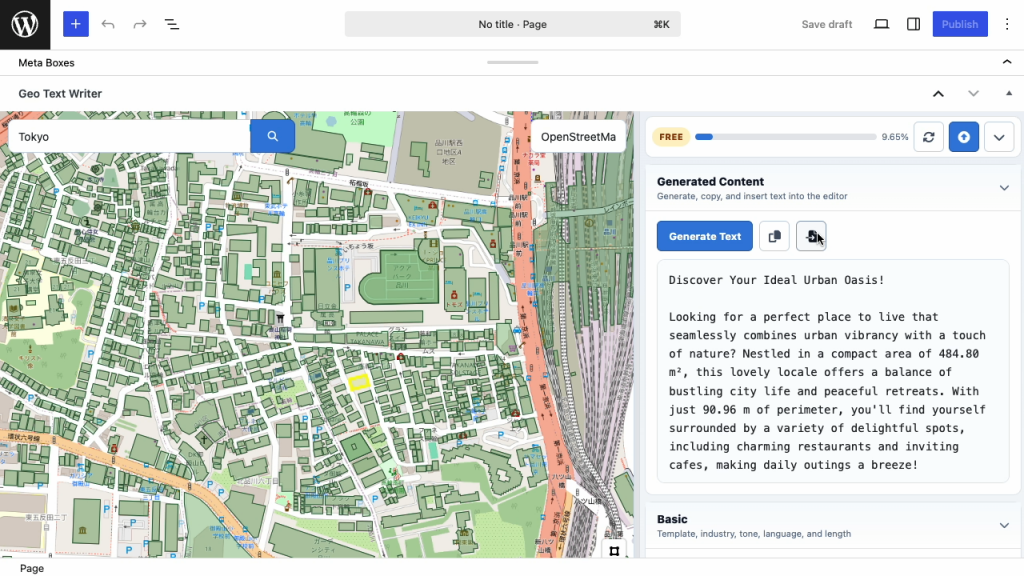
Create location-aware drafts from buildings, points, and areas on the map
Turn places on the map into locally grounded draft content.
O2 Location Text Assistant helps WordPress editors create location-aware text from selected buildings, points, and areas using environmental and map-based context.
Select a building polygon, draw a point, or define an area. Then fetch Environmental Data and Map Data directly inside the WordPress editor and use them to generate draft content that reflects the actual characteristics of the selected location.
How it works
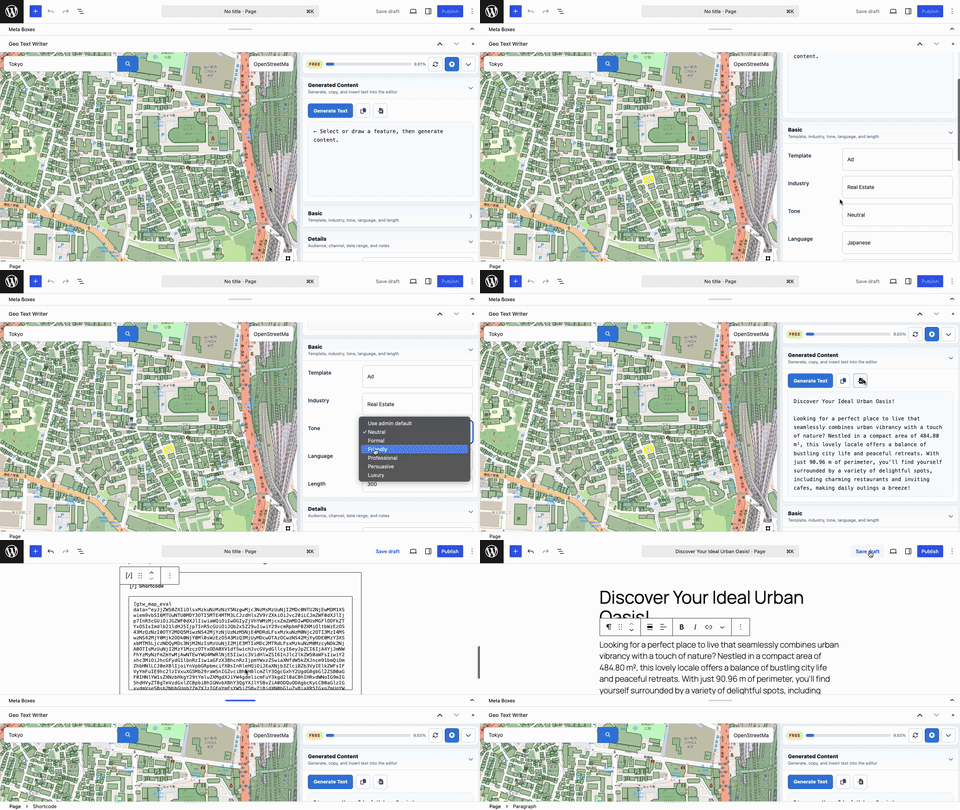
- Select a place
Choose a building polygon, draw an area, or place a point on the map inside the WordPress editor. - Add local context
Fetch Environmental Data and Map Data for the selected feature, including environmental indicators and surrounding map-based summaries. - Generate and insert
Set the template, industry, tone, language, length, audience, and notes. Generate a location-aware draft, then copy or insert it directly into WordPress.
Pricing
Credits
Credits are consumed based on the data and generation actions used in the editor. A typical article workflow is about 660–700 credits.
| Plan | Price | Credits | Estimated Articles |
|---|---|---|---|
| Free | $0 | 7,000 | ~10 articles |
| Extra Credits | $10 | 10,000 | ~14 articles |
| Pro | $30/month | 30,000/month | ~42 articles |
| Business | $100/month | 150,000/month | ~214 articles |
Article estimates are approximate. Actual usage depends on selected area size, building density, response size, and the data actions used.
Typical article workflow estimate
A normal article workflow usually includes building loading, Map Data, Environmental Data, and text generation.
| Step | Typical Credits |
|---|---|
| Load Building Polygons | 0 |
| Fetch Map Data | ~50 |
| Fetch Environmental Data | ~200 |
| Generate Text | ~400 |
| Total per Article | ~660–700 credits |
Credit Rules
Credits are calculated by endpoint and response size. Failed upstream requests do not consume credits.
| Action | How Credits Are Calculated | Typical Charge | What It Covers |
|---|---|---|---|
Building API | Based on compressed response size | From 0 credits | Loads building polygons for the selected map area. Dense urban areas may require more credits because they contain more buildings. |
Map API | Based on response size | From 50 credits | Retrieves surrounding map context such as land use, places, feature classes, subtypes, and nearby names. |
Environment API | Based on response size | From 200 credits | Retrieves environmental summaries such as vegetation, cloud cover, surface heat, and related satellite-derived indicators. |
Text API | Based on generated response size | From 400 credits | Generates location-aware draft text using the selected feature, retrieved data, and editor settings. |
Error | No charge | 0 credits | Requests that return an error do not consume credits. |
Who is it for?
Real estate teams
Create building-level and neighborhood-aware drafts for property pages, area guides, and listing support content.
Local marketing teams
Generate location-aware copy that reflects the surrounding map context and environmental characteristics.
Tourism and education pages
Draft area descriptions, local context explanations, and place-based editorial content from selected locations.
Regional media and editorial teams
Use map-based context to support articles, local explainers, and location-specific content production.
Consultants and agencies
Produce drafts at scale while keeping each output tied to the selected local context.
Why credits are based on data usage
Different locations require different amounts of data. A rural area may return only a small number of buildings, while a dense urban area may return many building polygons and larger map summaries.
The credit system reflects this difference. Small requests remain inexpensive, while larger responses consume more credits. Failed upstream requests do not consume credits.
Frequently Asked Questions
Does O2 Location Text Assistant work globally?
O2 Location Text Assistant is designed for global use and can work with large-scale building footprint and map datasets where data is available.
Why do building polygon requests consume credits?
Dense urban areas can return many building polygons. The charge is intentionally low, but not zero, so usage remains fair across different locations.
Do failed upstream requests consume credits?
No. Failed upstream requests do not consume credits.
Are article counts guaranteed?
No. Article counts are estimates based on a typical workflow of about 660–700 credits. Actual usage depends on selected area size, response size, and the actions used.
What data is used for generation?
The workflow can use selected feature geometry, map coordinates, Environmental Data, Map Data, and the form inputs entered by the editor.
Can I use it only for real estate?
No. Real estate is one strong use case, but the plugin can also support tourism, education, local marketing, agriculture, regional media, and other location-based editorial workflows.